AUTOMIORA AI Video Workflow

AI video workflow guide

AI video workflow: choose the first tool, copy the first prompt, and fix the first failure fast

Runway is the safest place to start when you need one short result this week. The first run usually fails on consistency, pacing, or prompt sprawl, so this homepage shows the primary tool, the fallback, the repair moves, and the prompt asset you can use immediately.

Start here first

Runway for the first short test. Pika only if the same failure repeats.

Typical first run result

You usually get one usable short clip fast, then spend the second pass fixing timing or consistency.

Next move

Copy the prompt, run one 5 to 15 second clip, and save the fix before you widen scope.

Visible shortlist

4 options already reduced into a primary choice, a fallback, and a reject path.

Workflow depth

5 named steps cover owner, input, output, success metric, and the first failure point to watch.

What most people get wrong

People cram hook, demo, and CTA into one prompt, then blame the tool when the output turns mushy.

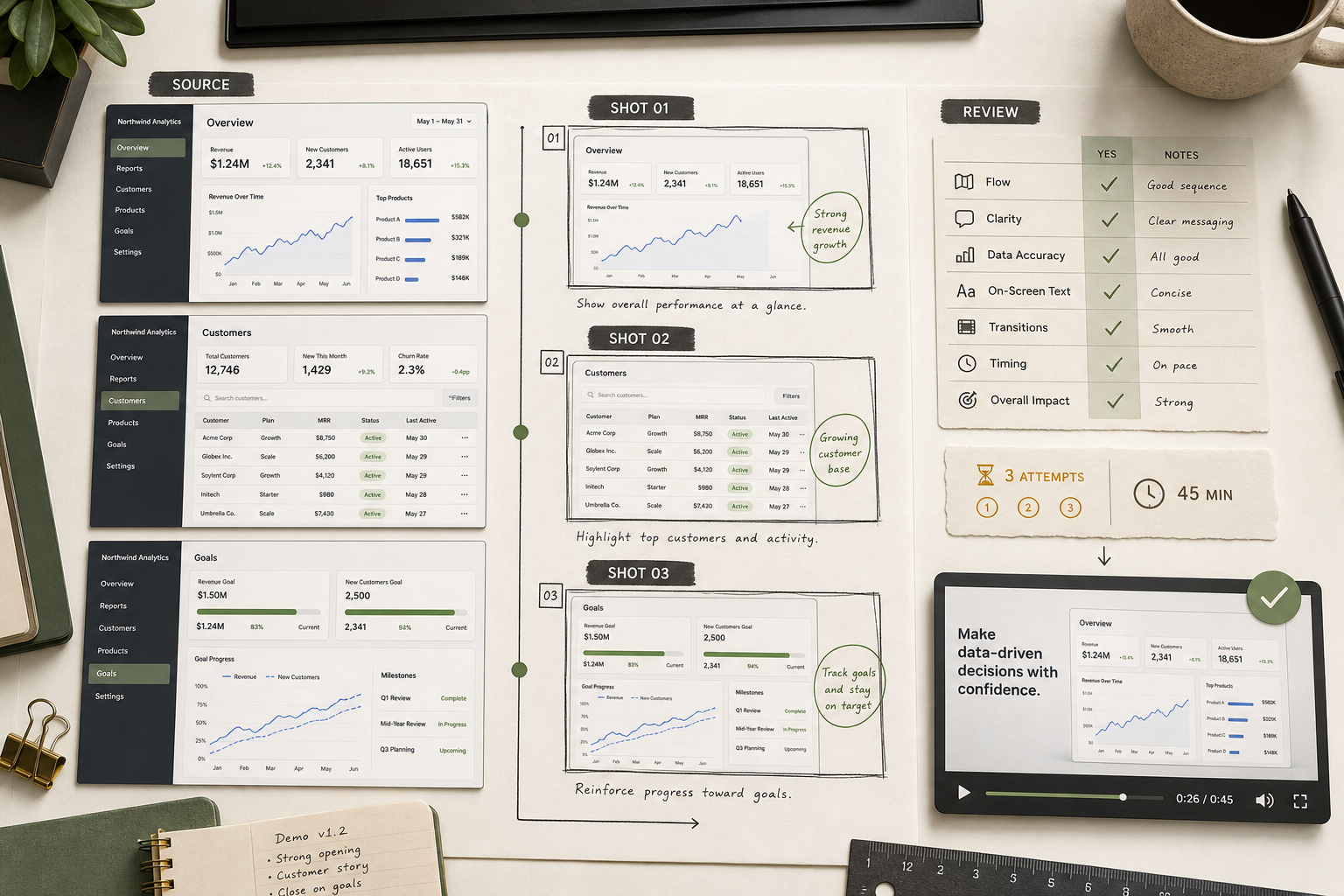
AI Video Workflow hero visual showing a practical workflow for short-form product demo videos.
AI Video Workflow homepage preview Primary asset: Prompt Pack

Shortlist

Compare the tools that actually deserve a live test

Use this table to decide the first click, the backup, and the switch trigger before you waste another cycle on prompts, pricing tabs, or sample renders.

ToolBest forNOT FORHidden costWhen to switchQuick verdict
RunwayBest
Fast short demos, product clips, and first-week testing.Long scenes, continuity-heavy edits, or one giant prompt that tries to cover the whole story.Credits disappear quickly once you regenerate long shots and cleanup passes.Switch to Pika when you need punchier motion, or move to Veo once the concept is proven and polish matters more than speed.Best first tool when you need a usable result fast, not perfect continuity.
PikaFast
Punchy short ads, energetic motion tests, and quick concept variations.Long tutorials, UI-heavy demos, or multi-shot sequences that must stay visually stable.You spend time re-running the same shot until the motion feels clean enough to keep.Go back to Runway for more control and editing, or move to Veo when the final output needs higher-end polish.Best fallback when you need motion energy fast, not full-scene reliability.
SeedanceFallback
Benchmarking another model after you already know the main failure pattern.The first tool you hand to a beginner, or the default choice for the main workflow.Every extra benchmark tool adds another prompt rewrite and another review standard.Only bring it in after Runway or Pika already failed and you need a benchmark result, not a fresh tool rabbit hole.Useful niche backup, not the first recommendation.
VeoPremium
Higher-end hero shots once the hook, message, and shot order are already proven.Speed-first testing, beginner exploration, or cheap iteration on a rough idea.The real cost is slower review loops and polishing shots you may still cut.Switch here after a cheaper tool already proved the script, shot order, and CTA.Best for final-polish output after the workflow is already stable.

Instant tool

Quick Prompt Generator

Choose the video type, style, and duration. The output stays local, is copyable, and is structured to avoid the usual first-run failure of cramming too much into one shot.

Real use notes

What these tools feel like on a real first run

These notes are here to help the visitor decide fast: where each tool works, where it fails, and when to stop forcing the wrong fit.

Runway Best

Best for Fast short demos, product clips, and first-week testing.

NOT FOR Long scenes, continuity-heavy edits, or one giant prompt that tries to cover the whole story.

When to switch Switch to Pika when you need punchier motion, or move to Veo once the concept is proven and polish matters more than speed.

Verdict Best first tool when you need a usable result fast, not perfect continuity.

Typical first run result

You usually get one usable short clip fast, then spend the second pass fixing timing or consistency.

What most people get wrong

People cram hook, demo, and CTA into one prompt, then blame the tool when the output turns mushy.

How teams actually use this

Teams use Runway for fast exploration, then keep only the best 5 to 8 second shots.

Long clips lose consistency after the first few seconds.

Why it happens Too many actions, camera moves, or scene changes are packed into one generation.

Fix Break the idea into shorter 5 to 8 second shots and lock one action per prompt.

Credits burn fast on re-runs.

Why it happens The first pass often looks close enough to tempt multiple cleanup generations.

Fix Write the shot list first, then regenerate only the broken shot instead of the whole clip.

Motion can feel flat on ad-style clips.

Why it happens The prompt is descriptive but not specific about pace or camera energy.

Fix Ask for one clear motion beat and fewer visual ideas per shot.

Pika Fast

Best for Punchy short ads, energetic motion tests, and quick concept variations.

NOT FOR Long tutorials, UI-heavy demos, or multi-shot sequences that must stay visually stable.

When to switch Go back to Runway for more control and editing, or move to Veo when the final output needs higher-end polish.

Verdict Best fallback when you need motion energy fast, not full-scene reliability.

Typical first run result

The first clip usually looks exciting, but one or two moments wobble when you watch it twice.

What most people get wrong

People accept fast output without checking frame-to-frame stability or text legibility.

How teams actually use this

Teams use Pika for fast concept motion and keep the prompt narrow to one visual beat.

Consecutive shots drift in style or subject stability.

Why it happens The model prioritizes motion punch over strong long-scene memory.

Fix Generate each shot separately and keep visual direction simpler.

Text or interface details wobble in demos.

Why it happens Fine-detail control is weaker when the shot includes too many moving parts.

Fix Use cleaner compositions and add precise UI overlays in editing instead of in generation.

Fast outputs hide broken motion.

Why it happens Speed makes it easy to review only the first impression instead of the full clip.

Fix Pause on the weak second, note the failure, and rerun only that beat.

Seedance Fallback

Best for Benchmarking another model after you already know the main failure pattern.

NOT FOR The first tool you hand to a beginner, or the default choice for the main workflow.

When to switch Only bring it in after Runway or Pika already failed and you need a benchmark result, not a fresh tool rabbit hole.

Verdict Useful niche backup, not the first recommendation.

Typical first run result

The output may show a useful contrast, but it usually adds decision work instead of removing it.

What most people get wrong

People compare too many tools before they even know why the first run failed.

How teams actually use this

Teams keep Seedance as a benchmark lane, not the main production lane.

Benchmarking slows the decision instead of clarifying it.

Why it happens Each new tool changes prompt behavior and review criteria.

Fix Score it against an existing Runway or Pika output instead of starting from scratch.

Beginners treat it like a primary choice.

Why it happens More options feel safer when the failure mode is still unclear.

Fix Use it only after the main pair already showed the exact limitation.

Public proof is thinner than the core shortlist tools.

Why it happens The operating knowledge is not as widely shared across teams.

Fix Keep it as a backup benchmark and document the reason before switching.

Veo Premium

Best for Higher-end hero shots once the hook, message, and shot order are already proven.

NOT FOR Speed-first testing, beginner exploration, or cheap iteration on a rough idea.

When to switch Switch here after a cheaper tool already proved the script, shot order, and CTA.

Verdict Best for final-polish output after the workflow is already stable.

Typical first run result

The visual quality looks strong, but the slower loop makes bad prompts feel expensive immediately.

What most people get wrong

Teams use Veo too early, before they know which shot actually deserves premium treatment.

How teams actually use this

Teams usually reserve Veo for the final hero shot or the version that goes to stakeholders.

Iteration feels slow compared with the rest of the stack.

Why it happens Higher-end output rewards fewer, better prompts instead of constant brute-force retries.

Fix Prototype structure in Runway or Pika first, then bring only the winning shots here.

A weak prompt wastes more team time than it does on faster tools.

Why it happens The slower cycle makes every vague revision more painful.

Fix Lock the hook, subject, and CTA before you run the polished version.

Teams overproduce polished shots they never publish.

Why it happens Once the quality is high, it is tempting to keep making alternates.

Fix Limit Veo to the one or two shots that actually carry the video.

30-minute pilot

The workflow you can actually run this week

Each step names the input, owner, output, and failure point so the first pilot does not collapse into unowned experimentation.

1 Choose the first production-shaped use case

Start with one narrow use case tied to short-form product demo videos, not the whole category at once.

Input
One concrete job like short-form product demo videos
Output
A narrow pilot brief with one owner, one channel, and one success metric.
Owner
The operator or marketer responsible for the first live test
Failure point
Trying to solve the entire category in one pass.
2 Collect the source asset and operating constraints

Define the input, output, owner, and quality bar before comparing tools or templates.

Input
Source screenshots, stills, launch notes, or the seed prompt plus output constraints.
Output
A short operating brief covering format, reviewer, deadline, and quality threshold.
Owner
The teammate who owns source material and final approval
Failure point
Comparing tools before the team agrees on what “good” looks like.
3 Shortlist the obvious options

Use Runway, Pika, Seedance, Veo as a starting field, then cut the list by buyer fit.

Input
One shortlist field plus the highest-risk comparison criteria
Output
A primary option, a fallback option, and one reason each survived the cut.
Owner
The buyer, operator, or builder making the implementation decision
Failure point
Keeping every visible option in play because the page never makes a recommendation.
4 Run one measurable pilot

Document baseline effort, first-pass quality, and the exact failure mode you hit in the pilot.

Input
One use case, one shortlist choice, and one defined output format
Output
A reviewed pilot with baseline effort, quality notes, and the first failure mode recorded.
Owner
The person executing and reviewing the first production-shaped test
Failure point
Calling the pilot a success without naming what had to be fixed by hand.
5 Turn the pilot into a reusable asset

Package the learnings into AI Video Workflow prompt pack so the next visitor or teammate can start faster.

Input
The winning prompt flow, checklist notes, or comparison criteria from the pilot
Output
AI Video Workflow prompt pack plus one repeat-run checklist or worksheet
Owner
The teammate who will hand this process to the next operator
Failure point
Leaving the learning inside a single person’s head instead of packaging it.

Repair guide

What usually goes wrong

These are the failures that show up before teams think they need a different model. Most of the time the fix is smaller than that.

The output looks unstable or generic.

Why it happens The prompt is trying to cover hook, product action, and CTA in the same generation.

Fix Split the scene into short shots and give each prompt one job only.

Prompt Rewrite this as three separate 5-second shots with one action and one camera move per shot.

The product or subject changes between shots.

Why it happens The clip is too long and the visual anchors are weak.

Fix Reuse the same subject wording, shorten the sequence, and regenerate only the broken shot.

Prompt Keep the same product, same angle, and same background. Regenerate only the second shot with one camera move.

Motion feels flat even when the clip is technically correct.

Why it happens The prompt describes visuals but not pacing.

Fix Ask for one explicit movement beat and reduce extra adjectives.

Prompt Add one clear motion beat: fast push-in on the problem, then quick reveal of the solution.

Trust signals

How teams actually use this

Typical first run result

You usually get one usable short clip fast, then spend the second pass fixing timing or consistency.

What most people get wrong

People cram hook, demo, and CTA into one prompt, then blame the tool when the output turns mushy.

How teams actually use this

Teams use Runway for fast exploration, then keep only the best 5 to 8 second shots.

Asset preview

What you get instead of another vague download

Brief intake block

A one-screen intake for source asset, target channel, conversion goal, reviewer, and publish-ready definition before prompting begins.

Variable prompt matrix

Prompt blocks for hooks, screenshot sequence, transitions, CTA framing, and variable placeholders that map directly to the first publish-ready short-form demo pass.

Repair prompts

Fallback prompts for generic output, weak motion, unclear CTA framing, or sequence drift after the first pass.

Review rubric

A compact QA rubric for clarity, motion quality, sequencing, and CTA placement before the clip leaves review.

Public routes

What to open next

Open the narrower page once you know whether the next question is comparison, workflow shape, pricing boundary, or reusable templates.

Open the workflow page

Use the 5-step rollout when the team already accepts the category and now needs the practical pilot path.

Open workflow

Open the comparison page

Use the shortlist view when the field is still too wide and the buyer needs a first recommendation and fallback.

Open comparison

Open the pricing page

Use the pricing path when the team needs to separate visible plan cost from review drag and reuse cost.

Open pricing

Open free vs paid

Use this when the workflow is leaving solo experimentation and turning into a recurring team process.

Open cost boundary

Open templates

Use the template page when the visitor is ready to turn one pilot into a reusable operating kit.

Open templates

Why this works

Why this homepage exists

Why this homepage exists

Most visitors do not need a broad AI video essay. They need to know which tool to try first, what usually breaks, and what to copy into the first short run.

That is why the homepage leads with a primary recommendation, one fallback, a copyable prompt, and the exact failure-to-fix path that gets the second run moving faster.

  • Primary choice: Runway
  • Fallback: Pika
  • Copy prompt before opening more tabs
How teams actually use this stack

Teams usually explore in Runway, keep Pika for the repeat failure case, and move to a higher-polish tool only after the shot order and CTA already work.

  • First run = short clip with one message
  • Second run = repair the broken shot, not the whole workflow
  • Final pass = polish only the shots worth keeping
Proof that the wiki asset system is reusable

The operator had screenshots, release notes, and a CTA, but no fixed brief, no stable shot order, and no reviewer-ready success bar. The first draft risk was a generic opening and a late CTA. The intervention was Use the Prompt Pack to lock the input, write the first-pass brief, generate hook options, build a 4-6 scene sequence, and define one reviewer note before the first render.. The result was A reviewer-ready short-form demo brief with a usable opening hook, a clearer screenshot sequence, and one CTA line that could be reused on the next release cycle..

The reusable artifact is prompt-pack, which is exactly what the next visitor should unlock instead of starting from a blank workflow.

  • Scenario: Feature-release screenshot set into a short-form product demo
  • Next scenario: Turn one product release into a short-form demo clip
  • Lesson: The pack is most useful when it reduces first-run ambiguity. It should make the first pass narrower, the first failure easier to name, and the second run faster than the first.

FAQ

Frequently asked questions

How do you start an AI video workflow without wasting the first pilot?

Start with one narrow pilot: one use case, one owner, and one publish target. If the first run works, turn that path into a reusable workflow before you widen scope.

Which AI video tool should you test first for a short-form product demo?

Runway is the best first test when you want one usable pilot quickly. Keep Pika as the fallback instead of expanding the shortlist too early.

Which tool should I start with?

Runway is the right first click for most teams because it gets you to a usable short test faster than a broad comparison loop. Keep Pika as the fallback, not a parallel rabbit hole.

How much does AI video cost?

Runway can look cheap on the pricing page and still become expensive once failed generations, regenerations, and review time pile up. Budget for credits plus rework, not only the headline plan price.

Why does AI video output fail?

Most first runs fail because the prompt asks for too many shots, too much motion, or too much style direction at once. Shorten the clip, cut it into separate scenes, and regenerate only the broken part.

Do I need API access to start?

No. Start in the product UI, run one short clip, and save the working prompt first. Add API access only after the team has a repeatable workflow worth automating.

Can I use prompts directly?

Yes, but use them as starting structure instead of magic text. A prompt works fastest when you already know the video type, duration, and the one action you want in each shot.

Get Prompt Pack -> Create your first AI video in 10 minutes

For beginners, marketers, and fast testers: copy the starter prompt, generate one short clip, and skip another round of trial-and-error.

Get Prompt Pack -> Create your first AI video in 10 minutes

Get Workflow Audit -> Fix your workflow in 30 minutes

Use the higher-intent audit path when the team already has a live workflow question, a named owner, and a concrete bottleneck to fix this week.

Get Workflow Audit -> Fix your workflow in 30 minutes